 6080bdc472
* Revert "Build firmware from Master branch" * Updated workflows * Added ENS160 (Air quality) and ENS210 (Temperature & Humidity) sensor * Revert "Added ENS160 (Air quality) and ENS210 (Temperature & Humidity) sensor" * pre-release 9.3.0 * Update README.md * Update xsns_05_ds18x20.ino Fix DS18x20 driver timing issue (#11270) * Prep release 9.4.0 * Prep 9.4.0 * Update Spanish and Italian * Update languages * Push rebuild * Update changelog * Update tasmota_version.h * Update CHANGELOG.md * Update README.md * Prep v10.1.0 * revert xlgt_01_ws2812 * Update xsns_69_opentherm.ino Add variable overrides * Revert "Update xsns_69_opentherm.ino" * Prep release * Prep release * Prep release 11.1 * Prep release 12.0 * Fix resolving MQTT and NTP servers - Fix resolving MQTT and NTP servers (#15816) - Bump version to v12.0.1 * Update RELEASENOTES.md * Update CHANGELOG.md * Release 12.1 * Release 12.1 * Revert camera changes * Prep v12.1.1 * Prep v12.1.1 * Prep v12.1.1 * OT bugfix * Prep release v12.2.0 * Prep v12.3.0 release * Revert Tuya change * add safeboot to release (#17393) * Update Tasmota_build_master.yml * Fix ESP8266 zifbee exception 3 * Update RELEASENOTES.md * fix needed depend. base32-images (#17406) * Fix ESP32 uploads * Create TASMOTA_FullLogo_Vector_White.svg * Fix support for non-sequential buttons and switches Fix support for non-sequential buttons and switches (#17967) * Fix duplicate EnergyTotal update * Update README.md * New workflow for release (#18722) * Update CHANGELOG.md * Update CHANGELOG.md * fix rs485 transmit * fix modbus * prep v13.1 * Prep v13.2.0 * Prep v13.3 * Update to v13.4.0 * Prep release v14.0.0 * Prep release v14.0.0 * Prep v14.1.0 * Prep v14.2.0 * Update CHANGELOG.md * Prep 14.4 * Update changelog * Prep v14.5.0 * remove abs from analog sensor * Update CHANGELOG.md * Prep release v14.6.0 * Update CHANGELOG.md * Prep v15.0.0 * change opentherm library * fixes for new open therm library * remove changes * remove changes --------- Co-authored-by: Jason2866 <24528715+Jason2866@users.noreply.github.com> Co-authored-by: Theo Arends <11044339+arendst@users.noreply.github.com> Co-authored-by: chrfriese123 <christoph@frieseonline.de> Co-authored-by: Alexey Pavlov <ap@profi.ru> Co-authored-by: Serge <60098151+Xjeater@users.noreply.github.com> |
||
|---|---|---|
| .. | ||
| src | ||
| keywords.txt | ||
| library.properties | ||
| LICENSE | ||
| README.md | ||
OpenTherm Arduino/ESP8266/ESP32 Library
This library provides implementation of OpenTherm protocol.
OpenTherm Library is based on OpenTherm protocol specification v2.2 and works with all OpenTherm compatible boilers. Library can be easily installed into Arduino IDE and compiled for Arduino, ESP8266/ESP32 and other similar controllers.
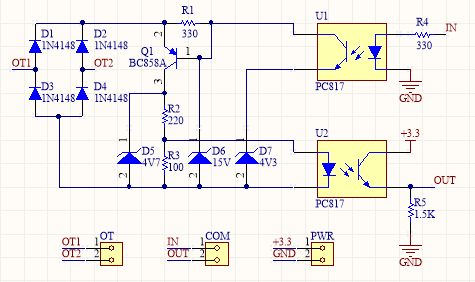
OpenTherm protocol requires simple low voltage twowire connection to boiler, but voltage levels (7..15V) still much higher than Arduino/ESP8266 levels, which requires OpenTherm Adapter.
This version of library uses interrupts to achieve better stability and synchronization with boiler.
Using OpenTherm Library you will be able:
- control your boiler remotely (get status, switch on/off heating/water heating, set water temperature and much more)
- make custom thermostat
Configuration and Usage:
#include <OpenTherm.h>
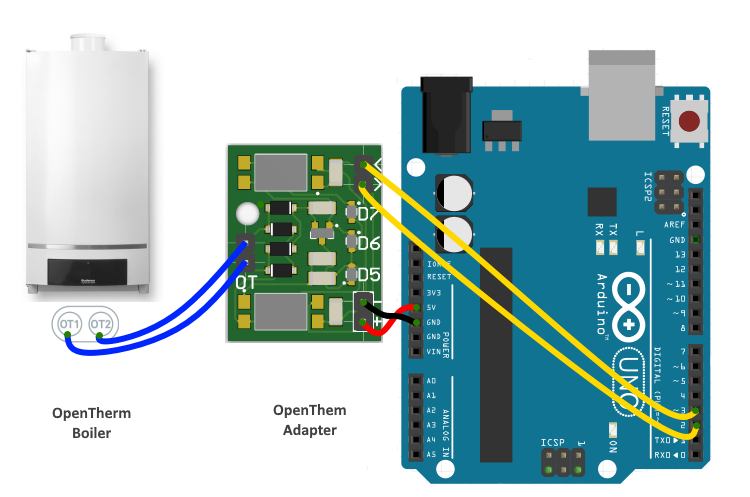
You have to choose 2 controller GPIO pins which will be used for communication and connected to OpenTherm Adapter. Controller(Arduino/ESP8266) input pin should support interrupts. Controller output pin should be connected to OpenTherm Adapter input pin and vise versa.
const int inPin = 2;
const int outPin = 3;
Define OpenTherm class instance using constructor which accepts as arguments pin numbers:
OpenTherm ot(inPin, outPin);
Define interrupts handler function for specified above instance:
void handleInterrupt() {
	ot.handleInterrupt();
}
Use begin function to initialize OpenTherm instance, specify interrupts handler function as argument
void setup()
{
    ot.begin(handleInterrupt);
}
According to OpenTherm Protocol specification master (controller) must communicate at least every 1 sec. So lets make some requests in loop function:
void loop()
{
    //Set/Get Boiler Status
    ot.setBoilerStatus(enableCentralHeating, enableHotWater, enableCooling);
    //Set Boiler Temperature to 64 degrees C
    ot.setBoilerTemperature(64);
    //Get Boiler Temperature
    float temperature = ot.getBoilerTemperature();
    delay(1000);
}
In details OpenTherm Library described here.
OpenTherm Adapter Schematic
Arduino UNO Connection
License
Copyright (c) 2018 Ihor Melnyk. Licensed under the MIT license.