
6.2 KiB
Berry Animation Framework
!!! note "Requires #define USE_BERRY_ANIMATION, included in Tasmota32"
A lightweight animation framework for controlling addressable LED strips (WS2812, SK6812, etc.) on Tasmota-based ESP32 devices.
Why a DSL?
Writing LED animations in pure Berry code requires understanding the animation engine internals, managing timing loops, and handling frame buffers manually. Animations are inherently asynchronous - they run over time while other code executes - making them difficult to manage with traditional state machines. The Animation DSL (Domain-Specific Language) simplifies this dramatically:
- Declarative, not imperative - Just specify what you want and how long it should take; the framework handles all intermediate states and timing
- No state machines - Forget about tracking animation phases, transitions, and timing manually
- Readable syntax - Write
animation pulse = pulsating_animation(color=red, period=2s)instead of dozens of lines of Berry code - Automatic engine management - No need to create engines, manage frame buffers, or handle timing
- Built-in effects - Access to pulse, breathe, fire, comet, sparkle, wave, and many more effects
- Dynamic parameters - Oscillating values (sine, triangle, smooth) without manual math
- Sequences and templates - Orchestrate complex shows with simple syntax
The DSL transpiles to standard Berry code, so you get the best of both worlds: easy authoring and full Berry compatibility. You can inspect the generated code, learn from it, or use it directly on devices without DSL support.
Online Emulator
Test and create animations without a Tasmota device using the online emulator:
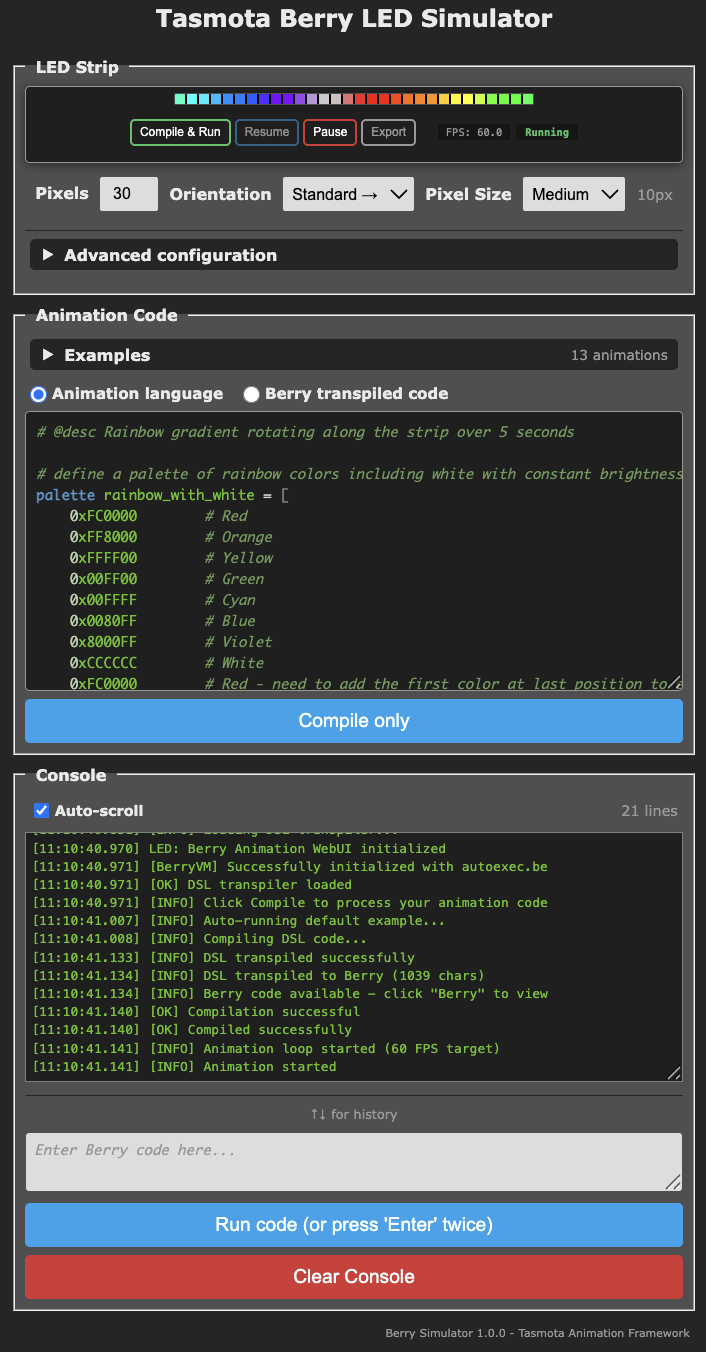 {width=353}{target=_blank}
https://tasmota.github.io/docs/Tasmota-Berry-emulator/{target=_blank}
The emulator runs entirely in your browser with no server required. It includes:
- A complete Berry interpreter compiled to WebAssembly
- Minimal Tasmota device emulation (LED strips, GPIO, timing)
- Real-time LED strip visualization
- DSL editor with syntax highlighting
Once your animation works in the emulator, copy the transpiled Berry code to your Tasmota device - it runs identically.
Firmware Options
| Option | Description |
|---|---|
#define USE_BERRY_ANIMATION |
Core animation framework (required) |
#define USE_BERRY_ANIMATION_DSL |
Optional: DSL compiler with simplified Web UI for on-device animation editing |
Without USE_BERRY_ANIMATION_DSL, use the online emulator to create animations and deploy the compiled Berry code.
Quick Start
Simple Breathing Animation
animation pulse = breathe_animation(color=red, period=2s)
run pulse
Rainbow Smooth Color Cycling
animation rainbow = rich_palette_animation(palette=PALETTE_RAINBOW)
run rainbow
Animation Sequence
animation red_pulse = breathe_animation(color=red, period=2s)
animation blue_pulse = breathe_animation(color=blue, period=1.5s)

sequence show repeat forever {
  play red_pulse for 4s
  wait 200ms
  play blue_pulse for 3s
  wait 300ms
}
run show
DSL Syntax Overview
Numbers
Time Values
Time values require a unit suffix and are converted to milliseconds:
500ms       # Milliseconds (stays 500)
2s          # Seconds (converted to 2000ms)
1m          # Minutes (converted to 60000ms)
Percentages
Percentages are converted to 0-255 range:
0%          # Converted to 0
50%         # Converted to 128
100%        # Converted to 255
Colors and Palettes
# Hex colors
color my_red = 0xFF0000

# Predefined: red, green, blue, white, yellow, orange, purple, cyan...

# Palettes for gradients
palette sunset = [
  (0, navy), (128, purple), (255, orange)
]

# Built-in palettes: PALETTE_RAINBOW, PALETTE_FIRE...
Value Providers (Oscillators)
Create dynamic values that change over time:
set breathing = smooth(min_value=50, max_value=255, duration=3s)
animation pulse = solid(color=red)
pulse.opacity = breathing
Available: smooth, triangle, sine_osc, linear, square, ease_in, ease_out, elastic, bounce
Template Animations
Create reusable, parameterized animation patterns:
template animation pulse_effect {
  param pulse_color type color
  param speed

  animation pulse = pulsating_animation(color=pulse_color, period=speed)
  run pulse
}

animation red_pulse = pulse_effect(color=red, speed=2s)
animation blue_pulse = pulse_effect(color=blue, speed=1s)

sequence show repeat forever {
  play red_pulse for 5s
  play blue_pulse for 5s
}
run show
Animation Reference
| Animation | Description |
|---|---|
solid |
Solid color fill |
pulsating_animation |
Breathing/pulsing effect with smooth transitions |
breathe_animation |
Natural breathing effect with customizable curve |
beacon_animation |
Pulse/highlight at specific position with optional slew |
crenel_animation |
Crenel/square wave pattern |
comet_animation |
Moving comet with fading tail |
twinkle_animation |
Twinkling stars effect |
fire_animation |
Realistic fire simulation |
rich_palette |
Smooth palette color transitions |
gradient_animation |
Linear or radial color gradients |
palette_gradient_animation |
Gradient patterns with palette colors |
palette_meter_animation |
Meter/bar patterns |
gradient_meter_animation |
VU meter with gradient and peak hold |
noise_animation |
Perlin noise patterns |
wave_animation |
Wave motion effects |
Documentation
- Quick Start Guide - Get running in 5 minutes
- DSL Reference - Complete syntax reference
- Examples - Comprehensive examples
- Animation Classes - All animations and parameters
- Oscillation Patterns - Dynamic value waveforms
- User Functions - Extend with custom Berry functions
- Troubleshooting - Common issues and solutions